
Introduction
Managing SEO for a growing website can quickly become complicated. Marketers need to research keywords, review competitors, optimize pages, monitor rankings, identify technical problems, and measure organic performance. When these activities rely entirely on manual processes, important tasks can be delayed or overlooked.
SEO automation tools help simplify this workload by streamlining repetitive activities and bringing useful data into a more manageable workflow.
However, choosing the right platform requires more than comparing feature lists. Businesses should consider their website's needs, the quality of the available data, ease of use, reporting capabilities, and the level of human oversight required.
This guide explains the essential features to evaluate when choosing SEO automation software and how to incorporate it into a practical optimization strategy.
What Are SEO Automation Tools?
SEO automation tools are software applications that simplify recurring search engine optimization tasks. Depending on the platform, they may automate keyword monitoring, technical checks, metadata creation, content analysis, reporting, or publishing processes.
Some platforms focus on one specific function, such as rank tracking or website crawling. Others combine multiple capabilities into an integrated SEO workflow.
AI-powered SEO software adds another layer by helping interpret information, generate optimization suggestions, and support content planning.
The objective is not to automate every SEO decision. It is to reduce repetitive work so marketers can spend more time on analysis, strategy, and improvements that matter to users.
1. Identify Your Website's SEO Requirements
Before choosing a tool, identify the problems you want to solve.
A small business website may need basic keyword research, page optimization, and monthly reporting. An ecommerce website may require product-page analysis, category optimization, and monitoring across hundreds or thousands of URLs.
An agency managing several clients may prioritize competitor research, repeatable audits, content workflows, and reporting.
Use the following table to match common SEO requirements with relevant tool capabilities.
SEO requirement | Useful tool capability |
|---|---|
Discover keyword opportunities | Keyword research and search-intent analysis |
Improve existing pages | On-page SEO analysis and content scoring |
Monitor search visibility | Keyword rank tracking and performance reporting |
Compare competing websites | Competitor keyword and content-gap analysis |
Improve search snippets | Meta title and description generation |
Identify technical problems | Site crawling and technical SEO auditing |
Streamline publishing | CMS integrations and publishing workflows |
Not every website needs every feature. Start with the capabilities that address your biggest SEO bottlenecks and expand your toolkit as requirements grow.
2. Look for Reliable Keyword Research Features
Keyword research helps determine which topics and search terms deserve attention. A useful SEO platform should help you explore keyword opportunities and organize them into a realistic content plan.
Look for features that support:
Keyword discovery based on a primary topic.
Search-volume estimates where available.
Keyword difficulty or competition indicators.
Related keyword suggestions.
Search-intent classification.
Competitor keyword comparisons.
Keyword grouping for content planning.
Remember that keyword metrics are estimates and may vary between tools. A keyword with substantial search volume may be too competitive for a newer website, while a more specific query could attract visitors with a stronger interest in your offering.
Evaluate keywords using relevance, competition, intent, and potential business value rather than volume alone.
3. Evaluate On-Page SEO and Content Optimization
On-page optimization helps search engines and users understand what each webpage covers.
The right software should make it easier to review important elements such as title tags, meta descriptions, headings, internal links, image alt text, and the relevance of the page's main content.
AI-assisted content analysis can also identify missing subtopics, unclear sections, and opportunities to improve readability.
For example, an article targeting “SEO automation tools” should explain what automation means, compare common capabilities, discuss selection criteria, and help readers understand which features suit their needs.
A useful tool should support this level of relevance rather than simply recommending repeated keyword insertions.
When assessing an SEO content score, treat it as a diagnostic aid. No single score can fully represent search intent, expertise, content usefulness, or the competitive landscape.
4. Choose Competitor Analysis Features That Support Decisions
Competitor analysis is most useful when it reveals actionable opportunities rather than simply producing a long list of competing keywords.
Look for software that can help you:
Discover keywords competitors rank for.
Identify topics your website has not covered adequately.
Compare the structure and depth of competing pages.
Find opportunities to strengthen existing content.
Prioritize topics based on relevance and realistic ranking potential.
Imagine that a competitor attracts traffic through several detailed guides about website indexing, while your site only publishes general SEO advice.
A competitor gap analysis could help you identify relevant supporting topics, such as XML sitemap optimization, crawl budget management, and indexation troubleshooting.
Before creating new pages, check whether existing content can be improved instead. This reduces unnecessary duplication and helps build a more organized website.
5. Consider Rank Tracking and Performance Reporting
SEO improvements need to be measured. Without monitoring, it becomes difficult to understand whether a change helped, had no effect, or created an unexpected problem.
Rank tracking can show how selected keywords change over time, while performance reports help connect those changes with broader organic search activity.
Useful reporting capabilities include:
Keyword position monitoring.
Search visibility trends.
Organic traffic and conversion reporting, where integrations support them.
Page-level performance analysis.
Competitor visibility comparisons.
Exportable reports for clients or internal teams.
For Google-specific performance data, Google Search Console remains an important source for impressions, clicks, click-through rates, and average positions. Google Analytics can help assess engagement and conversions.
An SEO automation platform should complement these data sources rather than encourage decisions based on rankings alone.
A page can attract more clicks without reaching the top position for its primary keyword, and a ranking improvement may not produce meaningful business results if the traffic is poorly matched to the offer.
6. Assess Technical SEO Capabilities
Content optimization cannot compensate for every technical issue. A page may struggle to appear in search results if it cannot be crawled, is blocked from indexing, or has conflicting canonical signals.
Depending on your website and existing technical setup, useful auditing features may include checks for:
Broken internal links and HTTP errors.
Redirect chains and redirect loops.
Missing or conflicting canonical tags.
Accidental noindex directives.
XML sitemap problems.
Duplicate or thin pages.
Missing metadata and heading issues.
Mobile usability and performance concerns.
Not all SEO automation platforms provide a complete technical crawler. Check the scope of each tool before assuming it can replace a dedicated technical audit.
Also, distinguish between warnings and actual errors. A missing meta description may be worth reviewing, but it is not equivalent to a critical indexing problem.
Prioritize issues according to their impact, affected URLs, and the evidence available.
7. Compare Pricing, Integrations, and Ease of Use
A tool can have many features and still be a poor fit if it is difficult to use or expensive relative to the value it provides.
Before purchasing SEO software, evaluate the following factors.
Pricing structure: Compare monthly or annual subscriptions, usage limits, project limits, and any additional costs.
Integrations: Check whether the platform works with your CMS, analytics setup, and reporting process.
Ease of use: Determine whether the interface makes common SEO tasks straightforward for your team.
Scalability: Consider whether the software can support more websites, keywords, or content as your workload grows.
Data access: Review export options, API availability, and the level of detail available in reports.
Support and updates: Check documentation, available support channels, and how the product handles changes in SEO workflows.
Some platforms offer one-time or lifetime payment options, while others use recurring subscriptions. Compare the actual terms, usage allowances, update policies, and long-term costs instead of assuming one pricing model is always better.
8. How Pyxa AI SEO Tools Fits Into an Automated Workflow
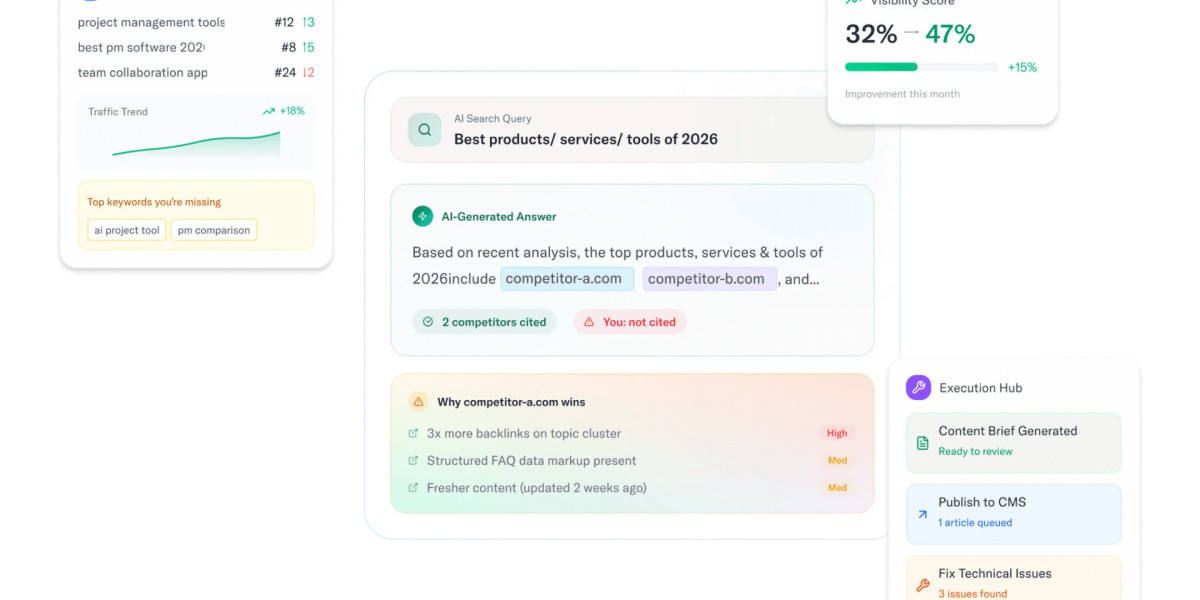
Pyxa AI SEO Tools lists features designed to help with keyword analysis, competitor gap analysis, content scoring, metadata generation, rank tracking, and on-page optimization. The page also describes WordPress publishing support.
These capabilities can be useful for bloggers, businesses, and marketing professionals who want to consolidate several content-related SEO activities into one workflow.
A practical process could look like this:
Research: Identify relevant keywords and evaluate the likely search intent.
Plan: Choose the page or article that best addresses the opportunity.
Create: Develop useful, original content that answers the audience's questions.
Optimize: Review headings, metadata, internal links, and relevant on-page elements.
Publish: Review and publish the approved content through the available workflow.
Monitor: Track performance and identify opportunities for further improvement.
Before relying on any feature, verify its current functionality and compatibility with your website. Automation capabilities differ across platforms, and not every workflow will be appropriate for every business.
9. Common Mistakes to Avoid When Automating SEO
Automation can improve consistency, but poorly configured processes may create more problems than they solve.
Avoid these common mistakes.
Publishing large volumes of unchecked AI content. Search performance depends on usefulness, originality, and relevance, not simply publishing frequency.
Targeting keywords without understanding intent. A high-volume keyword is not valuable if your page fails to meet what searchers expect.
Making bulk technical changes without testing. Changes to canonical tags, redirects, or indexing directives can affect important pages. Test carefully and maintain a rollback plan.
Ignoring existing content. Improving a page with established visibility may be more useful than publishing another article on the same topic.
Treating every recommendation as mandatory. SEO software provides suggestions, but they need to be evaluated against the website's architecture, content, and objectives.
Measuring only keyword positions. Track clicks, qualified traffic, conversions, and other business outcomes alongside rankings.
A balanced process combines automation with regular reviews, appropriate testing, and clear performance goals.
Conclusion
The best SEO automation tools are those that solve real problems in your workflow. Keyword research, content optimization, competitor analysis, technical auditing, and performance reporting can all help improve efficiency when they are used for the right purpose.
Start by identifying your website's needs, compare relevant features, and select software that fits your budget and existing processes. Then combine automation with human judgment to ensure every change supports a clear SEO objective.
Explore Pyxa AI SEO Tools to review its SEO-related capabilities and see whether they fit your website optimization and content management workflow.